Work Signals: How We Achieve Team Flow Across Humans and AI Agents

At Sage, people and agents use one shared protocol to notice work, avoid collisions, claim implementation and review, and close the loop by shipping.
AI agents create a ton more output.
That's the point.
Which means the need for coordination has never been higher.
Unfortunately, the issue trackers we inherited suck at this.
They were barely tolerable when humans produced work slowly enough to coordinate through meetings, Slack, and osmosis. Add agents—fast, parallel, persistent agents—and every weakness gets amplified: duplicate fixes, parallel branches, repeated reviews, abandoned work, passive assignments, and ownership nobody can interpret.
At Sage, people and agents can both notice work. Either can implement it. Agents open pull requests; people review them. Sometimes the person who notices a problem fixes it. Sometimes an agent does. Sometimes an agent notices something and hands it back to a person.
We needed one coordination layer for the whole system, so we built a workflow called Work Signals.
The surprising part is how low-tech it feels.
We mention things. We have conversations about them. We grab something when we're ready to work on it. We put it back if we stop. We hand something to an agent, or an agent hands something to us for review.
It has also become more useful to me than any issue tracker I've ever used.
Why traditional issue tracking never worked for me
I've never been good at issue trackers.
That isn't because I don't care about rigor. It's because the effort-to-payoff ratio has always felt wrong in a real company shipping a live product to real customers.
You're deep in one task when you notice something else: a bug, a rough interaction, a missing state, a small architectural improvement. You could stop, open the tracker, find the correct project, try several searches, fill out fields, choose a priority, assign it to someone, and then attempt to recover the context you were in.
Usually, that isn't worth it.
So you keep going. The thought stays in your head briefly, then disappears.
Or you mention it in Slack, interrupt several people, and then it disappears.
Or you create a ticket and assign it to someone. It joins a pile of other assigned things whose status is technically known but operationally meaningless.
Those problems already existed on human teams. Agents make solving them urgent. When the cost of producing work drops, ambiguity about who is doing what becomes even more expensive.
The problem isn't that people or agents fail to notice enough. It's that our systems make preserving and coordinating those observations too expensive.
A signal begins in the moment
The first problem Work Signals solve is personal.
It's a spacetime problem:
Think of the right thing in this moment. Preserve it cheaply. Return to it in another moment. Do the work.
Those are four separate events. Most productivity systems pretend they are one.
The moment when you see a problem is often the worst possible moment to solve it. You may be testing something else, talking to a customer, or deep in another implementation. You have the relevant perception, but not the available time.
A Work Signal lets the thought survive without turning capture into a second job.
You say:
“Has anyone noticed that the voice orb sometimes stays lit after the bot stops speaking?”
Your agent searches the shared Work Signals ledger. If nothing close exists, it offers to preserve the observation. One confirmation, no form.
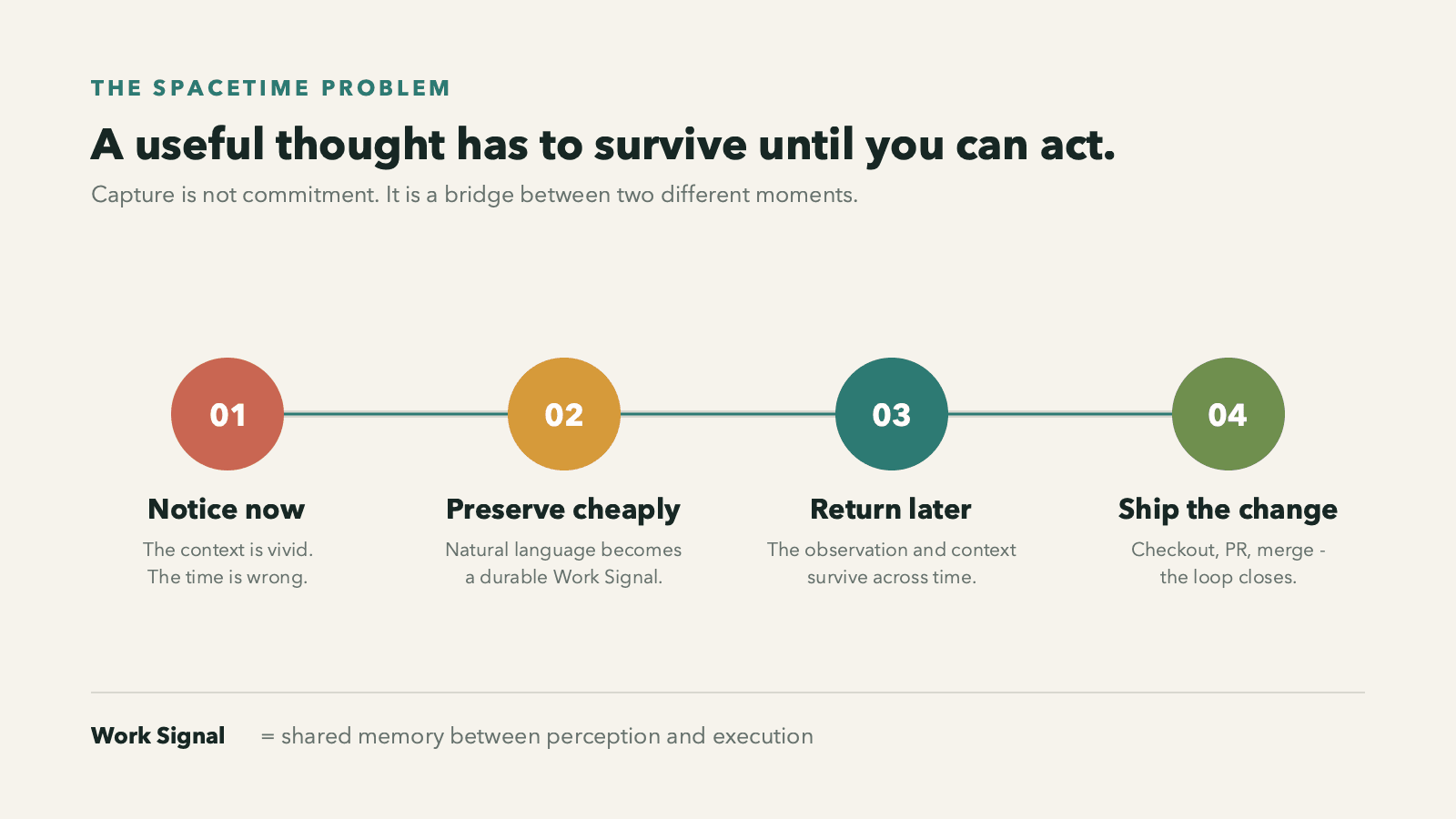
A signal is not a promise to do the work immediately. It is not a priority decision, sprint commitment, or roadmap item.
It says only:
This was noticed. Here is enough context to find it again.
Capturing a perception should be much cheaper than deciding its entire future.
We've extended this all the way into the Sage app itself.
We can now experience the product exactly as our users do and preserve an observation without stepping outside that experience to document it. In the middle of a live learning session, we simply tell Sage that something should become a Work Signal. The relevant transcript and session context flow into the same agent workflow.
We no longer have to reconstruct the moment later from memory, a screenshot, or an abstract bug report. We can make product decisions from inside the exact experience that produced them—seeing what the learner sees, hearing what the learner hears, and feeling the same timing and friction.
The decision density is through the roof.
A single session can produce a stream of precise, context-rich observations without becoming a note-taking exercise. The product experience itself becomes part of the team's notice network.
Search before create
Once observations become shared, a second problem appears:
Did someone else already notice this? And is anyone acting on it?
Before creating a Work Signal, the agent searches the existing ledger semantically. It isn't just matching keywords. It is judging whether two differently worded observations point to the same underlying thing.
That search is essential—and prohibitively expensive without automated semantics.
No person is realistically going to scour every existing issue whenever they notice a small problem. They will try one or two phrases, miss the differently worded ticket, and create a duplicate. Or they will decide the search isn't worth the interruption and create nothing.
An agent can do the expensive part at the moment of capture. The answer comes back in a form a person can use immediately:
- Nothing close: preserve a new signal.
- Already noticed, unclaimed: add your observation or check it out.
- Checked out: someone is actively working on it.
- In a PR: a concrete solution is already moving.
- Ambiguous: inspect the two or three plausible matches before doing anything.
When two observations are the same, we add an “also noticed” comment instead of creating a second issue. Multiple encounters become useful evidence without fragmenting the work.
This is cheap shared awareness. It replaces a surprising number of “Is anyone working on this?” messages, meetings, and accidental collisions.
Checkout is active; assignment is passive
The most important piece of the workflow may be the word checkout.
Most trackers have assignees. Assignment is passive. A ticket can remain assigned to you for months while nothing happens. Eventually, nobody knows whether you own the problem, intend to solve it, looked at it once, or simply forgot it.
A checkout means something stronger:
The work is happening now.
When a person checks out a signal, we immediately connect it to a draft pull request containing:
Fixes SAGE-123The observation, active branch, and proposed change are linked from the beginning—not reconstructed at the end. When the PR merges, the signal closes automatically.
If you stop working on it, you release it. It becomes visibly available again.
Checkout is like taking a book from a library instead of having someone permanently place it on your desk. Everyone can see that it is in use, who has it, and when it has returned.
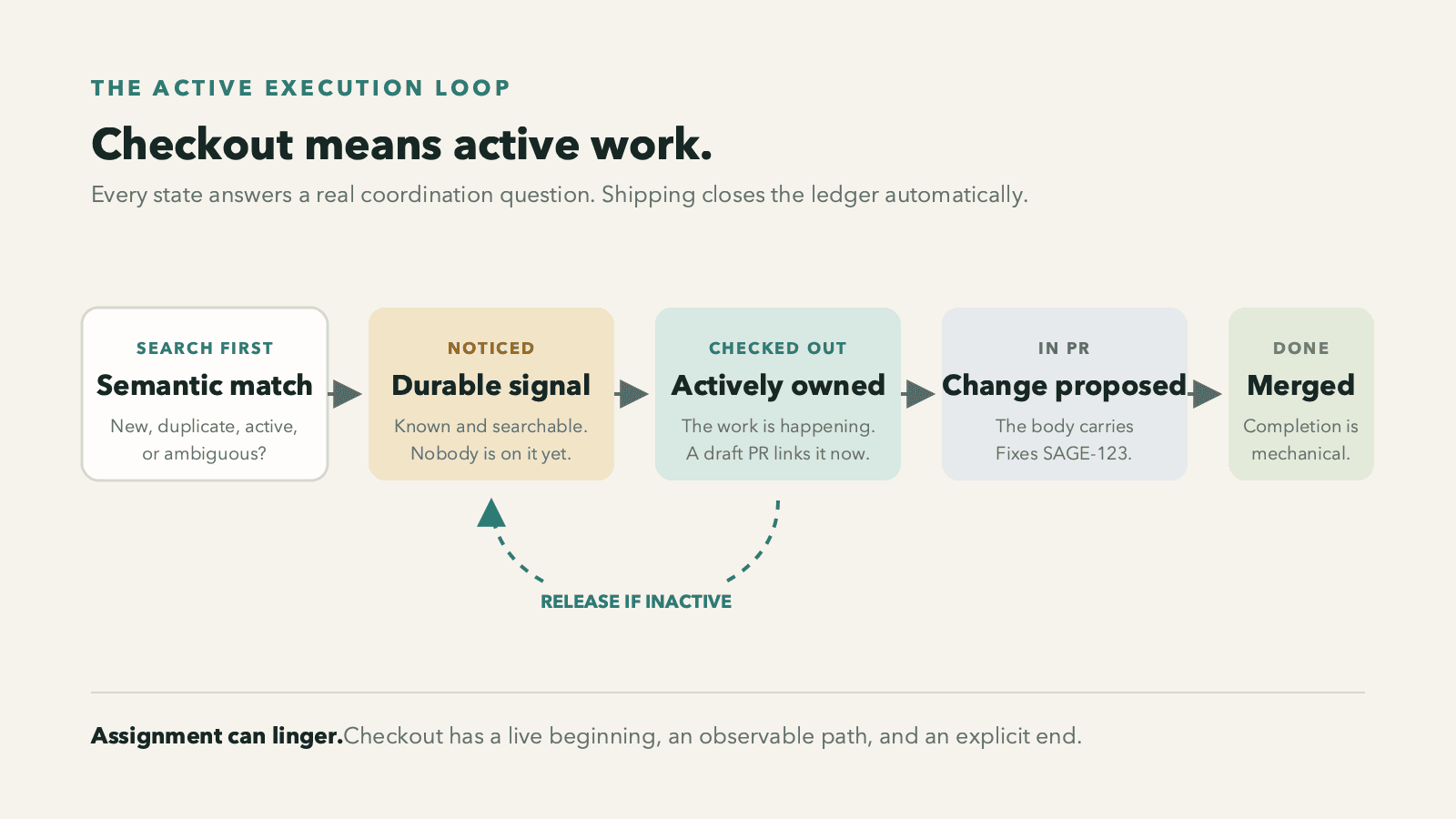
The complete loop is intentionally small:
Notice → search → preserve or dedupe → check out → PR → merge → done.
No estimates by default. No priority taxonomy. No cycle ceremony. No requirement that every PR begin with a ticket. The human steps should remain cheaper than explaining the issue in Slack, and shipping should close the loop without anyone remembering to update a status.
One protocol for people and agents
This is the part that makes Work Signals especially useful now: people and agents do not operate in separate coordination systems.
A person can notice work. An agent can notice work. Either can implement it. An agent can open a PR, and a person can check out its review.
Everyone coordinates through the same three questions:
- Has this already been noticed?
- Is anyone acting on it now?
- What event will make it done?
For human work, checkout means implementation is active.
For automated work, the signal first shows that an agent is coding. Once the agent opens a PR, the signal becomes available for human review. A person checks out that review, preventing two people from unknowingly reviewing the same agent work. Merge closes the signal.
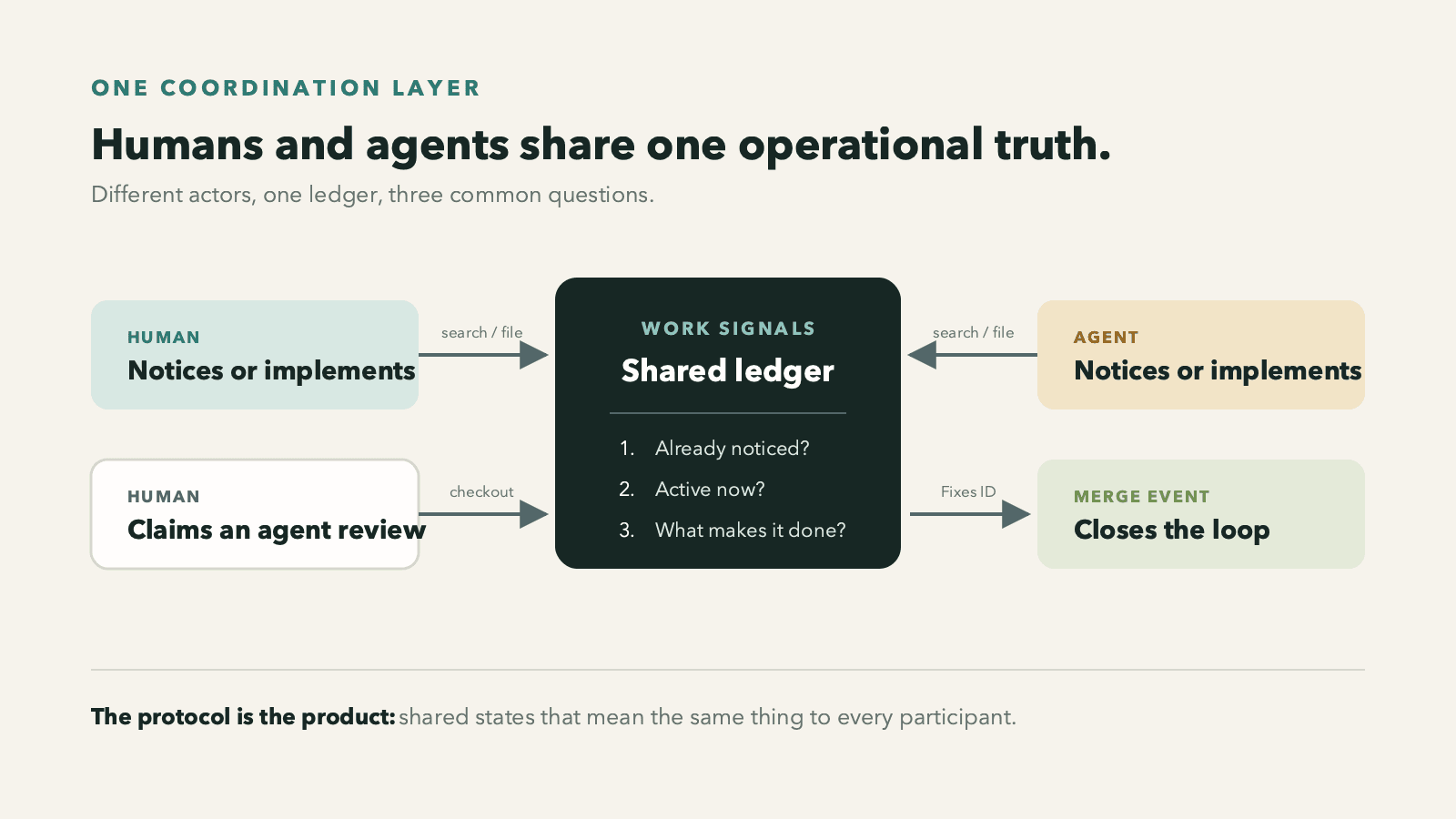
As agents become persistent participants in software teams, this shared layer becomes critical.
The answer is not a separate management system for agents. It is a few legible states that mean the same thing to every participant.
Noticed means the observation exists.
Checked out means the work is happening.
In PR means there is a concrete proposed change.
Done means it merged.
Agents don't merely increase the speed of implementation here. They make the entire protocol viable. They perform the semantic search, carry context, interpret status, update the ledger, open or connect the PR, and hand work between humans and automation.
The workflow feels simple because the agents absorb the coordination overhead.
Sophisticated machinery, homespun experience
None of this is actually low-tech.
Underneath the simple gestures, agents are interpreting conversation, searching across differently worded observations, judging duplicates, carrying context into durable records, reading ownership state, and connecting work to branches, PRs, and reviews.
Without modern AI, each gesture would expand back into forms, fields, filters, manual searches, naming conventions, and status hygiene.
The machinery is sophisticated precisely so the experience doesn't have to feel sophisticated.
I think this is a sign of where software is headed: toward systems that feel more organic, semantic, semiotic—almost biological. We communicate through small, meaningful signals. The system understands enough context to help each signal find the right place, actor, and moment.
The shape is the product
I'm describing the shape of our workflow, not prescribing our specific implementation.
Our version uses the tools already embedded in how we work. The particular ledger, agent interface, and code-hosting integration matter less than the protocol connecting them: notice, search, deduplicate, check out, review, ship, close.
That is another part of the paradigm shift.
In fact, you could copy and paste this article directly into your agent and say:
Build this for my team using the tools we already work in.
It could spin up a useful version lickety-split—inside your existing issue tracker, code host, chat environment, or some combination of them. I encourage you to do exactly that—and let me know how it goes.
The workflow no longer has to arrive as a SaaS product that asks everyone to migrate into someone else's assumptions. It can be expressed as a set of meanings and behaviors, then instantiated by an agent inside the environment where the work already happens.
The transferable artifact is the protocol itself. The implementation can be local, lightweight, and yours.
This is a profound change in how software can spread: not only as packaged code, but as a sufficiently clear description of a useful shape that another agent can reproduce.
Flow, not storage
Our early data suggests the system is behaving differently from a backlog.
So far, 68% of completed signals have landed inside 24 hours, with a median notice-to-completion time of 14.2 hours.
But, as with every issue tracker, some signals are becoming stale.
We don't want to pretend an aging Work Signal is a durable plan. So the next thing we're going to try is giving signals a shelf life.
After roughly a week, an untouched signal dies.
That's it.
No ceremony. No notification demanding that someone re-triage it. No ritual move into a colder backlog where it can live forever and make the system steadily less trustworthy.
Work Signals exist for team flow. They preserve current perception across a short distance in time and make it available to whoever has the context and energy to act. They are not roadmap artifacts, long-term commitments, or a warehouse for every idea the company has ever had.
If something needs durable strategic life, it belongs in a different system with different expectations.
And if an expired problem is real, we will probably notice it again. The new signal will arrive with fresher evidence and current context. That feels healthier than maintaining a graveyard of technically open, socially dead tickets.
The goal is not perfect institutional memory.
The goal is sustained flow.
A small protocol with surprising leverage
A live product continuously produces a class of work that planning systems handle poorly: things noticed in motion.
These observations arrive asynchronously, in the wrong order, to different people and agents, while everyone is already doing something else.
Work Signals give that work a shape.
They are cheap enough to use at the instant of perception, durable enough to cross time, semantic enough to converge duplicates, active enough to show what is truly happening, and temporary enough not to become another backlog.
Because this is a shape rather than a product, it can be reproduced inside the tools each team already uses.
This is the shared workflow we're using at Sage:
Preserve the observation. Search the collective memory. Check out the work when it becomes active. Connect it to the change. Let shipping close the loop. Then let the rest decay.
Somehow, this simple, homespun agentic workflow is already infinitely more useful to me than any issue tracker I've used before.
It's a small protocol.
But small protocols, used consistently by people and agents, can create a surprising amount of leverage.
Get our latest insights
Subscribe to receive new posts on AI and education delivered to your inbox.
To keep up with our latest thoughts on the intersection of AI and Education, follow us on X at @sage_teacher.