For parents and pediatric professionals
How do I choose shows, games, and apps for my child?
Choose shows with clear stories and manageable pacing, and apps that keep children thinking, learning, or creating. Look for clear stopping points and avoid designs built around endless feeds, distracting rewards, or pressure to keep playing.
Explore calmer screen timeHow can I tell whether a show or app is a good choice?
Holding a child’s attention does not necessarily make a show or app good for them. A children’s show may hold attention through constant stimulation, while an educational app may keep children chasing prizes rather than focusing on what they are learning.
Look at what children are asked to do, how easily they can follow the experience, and whether it has a clear stopping point. A children’s label, an educational promise, or a child’s enthusiasm does not answer that question on its own.

Clinicians can help parents look beyond the label and their child’s enthusiasm to understand how the experience is designed and how that design may contribute to difficulties during and after screen time.
What should I look for in a children’s show?
Look for a story your child can follow, with time to take in each scene and sound that supports what is happening. Frequent cuts, constant camera movement, and layers of music or effects are reasons to look more closely at how much your child is being asked to process.
These features can also make sustained watching look like sustained concentration. A child who rarely looks away may appear to be following closely, but their gaze alone cannot tell a parent what they understand. The AAP advises avoiding rapid-fire content that young children may struggle to process and choosing material they can understand and discuss. [1]
What should I look for in a video platform?
Choose a platform that lets you select the content and stop playback, with controls to turn off autoplay and recommendations. Endless short-form feeds remove those pauses and hand the next choice to the platform. A clip built around a quick hook and payoff may pack speech, action, and visual changes into a few seconds. YouTube Shorts and Instagram Reels are not safe options for children.
When a recommendation system takes over, you are no longer selecting each video. The platform may prioritize whatever keeps your child watching, rather than what you would choose for them. The AAP identifies recommendation algorithms and autoplay as features that can encourage prolonged use, and recommends controls that let families turn them off. [8]
Clinicians can help families make a more deliberate choice by recommending specific programs rather than an open-ended feed. Parents can choose media with understandable dialogue, quieter moments, and a story their child can follow.
When a particular program regularly precedes crankiness or restlessness, the AAP suggests replacing it with slower content for two to three weeks and watching for improvement. [1]
What makes a game or app worth choosing?
Choose games and apps that ask children to think, practice, solve a problem, or create something. Look for interaction that serves that activity, rather than tapping mainly to collect prizes or keep a streak going.
What is the child being asked to do?
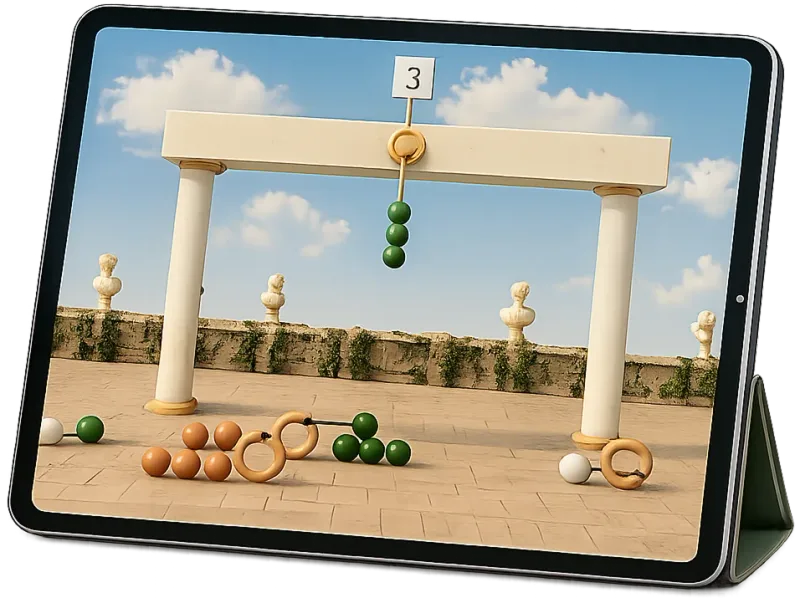
Interactivity is useful when it serves the activity. Moving objects to count them lets a child work with a quantity. Choosing how to build something gives them a problem to solve. By contrast, silently tapping to submit answers and collect prizes may keep a child busy without asking much of them. The important distinction is what the interaction contributes to the experience.
How is the child rewarded for their actions?
The AAP identifies reward mechanisms as another design choice that can encourage prolonged use. [8] To understand the pull, consider what the child is waiting for. It may be a new idea or the satisfaction of solving a problem. But it may also be a mystery prize, a bonus, or another chance to fill a reward meter.
Dopamine helps the brain learn which actions lead to rewards. An unexpectedly good reward produces a stronger dopamine response than one that is fully expected. [9] Games can build around that process by varying when a prize arrives and how valuable it will be. This resembles a slot machine’s use of unpredictable wins: the next attempt might deliver something better, which gives the player a reason to continue.
That creates a problem for an educational app when the prize becomes the purpose of the activity. A child can rush through answers to unlock the next reward without taking much interest in the ideas. The app has succeeded at keeping the child playing, but that is a different goal from helping the child learn.
Does an educational label mean an app is a good choice?
An educational label is not enough: look at whether the activity supports learning and whether its effects and rewards distract from that work. A counting activity may ask a useful question, then interrupt it with confetti, bouncing characters, flashing stars, and a prize. Parents should look at how much of the experience is devoted to learning and how much is spent presenting rewards.
Color and animation should help children understand where to look and what to do. Highlighting a word can direct attention to the word being read. Moving objects can demonstrate how a quantity changes. But when the background, buttons, characters, and rewards all flash or move, those features compete with the lesson. The question is whether the design helps the child follow the activity or repeatedly interrupts it.
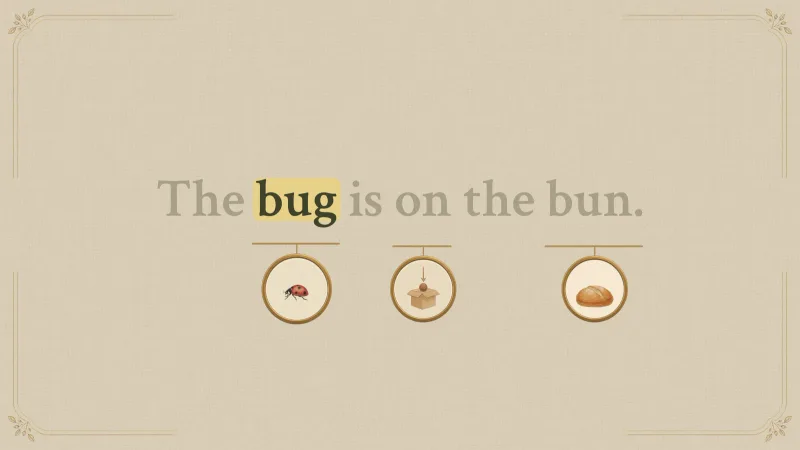
Directing attention to the task: a highlighted word and picture cues in Sage’s reading activity.
Parents can look for a clear visual focus, time to respond, and feedback that explains something useful.
If a child makes a mistake, does the app help them understand it?
Are they instructed when they make a mistake or can they jam buttons until the app signals correctness and delivers a reward?
When they succeed, does it build on that understanding, or stop the activity to deliver another burst of animation and sound?
Your next step
Choose screen time that teaches
Give your child reading and math lessons with a personal AI teacher, plus room for creative exploration. Sage Teacher has no points, prizes, or streaks competing for their attention. Try seven days free.
Start my free trial with Sage TeacherFrequently asked questions
What should I look for in a children's show?
Notice the pacing, camera movement, sound intensity, and how much is happening at once. A child staying glued to a show does not by itself show that they understand it.
How can I tell whether an app helps my child learn?
Look for interactions that help your child think, practice, create, or understand the activity. Tapping to collect prizes can keep your child busy without contributing much to learning.
Does an educational label mean an app is good for my child?
No. Check whether the design gives your child time to respond and feedback that explains something useful. The AAP's content-selection guidance is a useful companion.