For parents and pediatric professionals
Screen-Time Guidance for Pediatric Professionals
Research and practical guidance for pediatric professionals on screen-time limits, content choices, difficult transitions, and helping families change their routines.
Explore calmer screen timeHow much screen time is too much?
When a parent brings this question to a pediatric visit, it is not always as simple as recommending a time limit. There are distinct patterns of screen use that may each require their own set of solutions.
A useful starting point is a closer look at the family's screen-time routine.
How much time is the child spending on screens?
What are they watching or doing?
When does the device come out, and what happens when it goes away?
The answers help identify which changes would address the problem the family actually needs help with.
Not all screen time is created equal. Content deserves particular attention because families are often choosing among very different experiences. Passive media like movies, shows, and online videos present a different set of concerns compared to more interactive experiences like apps and games. The pacing, subject matter, and stopping points also differ. Changing the content to something more interactive and low-stimulation can be part of changing the family's relationship with screens.
A useful screen-time conversation considers the amount of screen time, the quality of the experience, and its place in family life.
This article brings these considerations together for pediatric professionals. It also explains selected decisions we made in building Sage Teacher, a calm learning app for ages 4–8, and the role it can play for families who are looking for better screen time options.
Question 01
What if my child keeps asking for more screen time?
When a parent describes a child constantly requesting a device, the first task is to understand how access is currently decided.
The AAP's Family Media Plan recommends that families agree on when screens are available, what content is appropriate, and which parts of the day remain screen-free. For a family caught in repeated negotiations, those decisions should be made and communicated to the child before the next request arrives. [1]
Read the full guidance →Question 02
How can I help my child calm down after screen time?
Putting away a device can be the hardest part of screen time. A child may beg for one more video, grip the tablet tighter, or burst into tears when a parent takes it away. Even after the crying stops, the child may remain restless or snap at small requests. Parents are left trying to help their child settle down so the family can get on with the day.
To understand this reaction, it helps to consider what stopping asks of a child. They have to pull their attention away, accept that an enjoyable activity is over, and cope with wanting more.
Read the full guidance →Question 03
How do I choose shows, games, and apps for my child?
Holding a child’s attention does not necessarily make a show or app good for them. A children’s show may hold attention through constant stimulation, while an educational app may keep children chasing prizes rather than focusing on what they are learning.
Clinicians can help parents look beyond the label and their child’s enthusiasm to understand how the experience is designed and how that design may contribute to difficulties during and after screen time.
Read the full guidance →Question 04
How can I help my child handle boredom without screens?
A phone or tablet can quickly quiet a restless child. It fills the wait at a restaurant, offers something to do in the car, and distracts from a task that has become frustrating. That relief can make screens the first thing a parent reaches for and the first thing a child asks for. Families may eventually find that even a short wait feels impossible without one.
The challenge is helping the child learn what to do with those uncomfortable feelings.
Read the full guidance →Question 05
How can I help my child enjoy screen-free activities?
Parents may notice that their child can watch videos for a long time but she loses interest in a book, puzzle, toy, or imaginative play within minutes. Attempts to start something together end with the child asking for the tablet. Parents want to help their children enjoy these activities again, but they may struggle to make them feel as appealing as the screen.
Part of the difficulty is that these experiences ask different things of the child. A fast-paced video keeps introducing something new to watch. Many games supply the next goal, prompt, or reward. In contrast, building with blocks requires the child to decide what to make, work out how to make it, and stay interested as the idea develops. The child has a larger role in creating and sustaining the activity.
Read the full guidance →Question 06
How do I maintain consistent screen rules and boundaries?
Screen rules can become difficult to maintain when several adults share a child’s care. One parent may put the tablet away during meals, while another uses it to keep dinner peaceful. A grandparent may allow videos that parents have decided to avoid. Each adult may have an understandable reason for their choices, but the child receives different messages about what is allowed. Parents can feel that they are constantly trying to restore a boundary someone else has changed.
A clinician can help the family look beyond the child’s repeated requests and identify where the adults’ expectations differ. The issue may be disagreement about a rule, difficulty following it, or simply not knowing what another caregiver has already allowed.
Read the full guidance →Question 07
How do I balance my child's screen time with sleep, play, and other activities?
For the clinician, the useful question is what the family is losing time for. The AAP calls this “crowding out” in its Five Cs framework. It recommends asking families what they want to make more room for, such as time outdoors, better sleep, or time together. A limit has a clearer purpose when parents can connect it to something they want their child to have. [2]
A family does not have to reorganize the whole day at once. If bedtime keeps slipping, start there. If meals have become silent because everyone is watching something, begin with one device-free meal. The clinician can help parents choose a change that addresses their main concern and consider whether it is making daily life better.
Read the full guidance →Question 08
How can I keep my child occupied without a screen?
Helping a family rely less on screens starts with understanding what screen time makes possible for the parent. Advice to replace a video with an activity together may be helpful when an adult is available. It does little for a parent who needs to take a call. The alternative has to fit both the child’s abilities and the demands on the caregiver.
A useful starting point is a situation the family encounters regularly and feels able to change. That might be breakfast, the first part of dinner preparation, or a short household task. The clinician can help the parent choose an alternative the child already knows how to enjoy, with an amount of support the parent can provide.
Read the full guidance →Question 09
Are AI apps appropriate for children?
Clinicians can help families examine the role the AI plays. A tool that guides a defined learning activity raises different questions from a chatbot that offers open-ended conversation or presents itself as a friend. The important decisions are what the system is allowed to do, what it asks the child to do, and how adults remain involved.
AI can make schoolwork look easier by supplying an answer. But finishing the task does not mean the child has learned how to do it. A useful learning tool asks for an attempt, responds to the child’s reasoning, and offers enough help for them to take the next step.
Read the full guidance →Help families build lasting screen-time habits
A useful conversation about screens starts with what is happening at home. A family struggling with bedtime may need a different plan from one dealing with constant requests for the tablet. Understanding the difficulty helps the clinician recommend a change that fits the child and the people caring for them.
Screen-time questions
Does educational screen time count toward a family’s screen-time limit?
Yes. Learning on a device still takes time that could be spent sleeping, playing, moving, or talking together. A family can choose worthwhile content and still set a clear limit. The AAP’s Family Media Plan helps families decide where screen use fits alongside the other parts of their day. [1]
What should a screen-time conversation cover beyond minutes?
Ask what the child watches or does, when the device comes out, how stopping goes, and which activities screen use displaces. Use the family’s main difficulty to choose one practical change. See the article’s starting questions and the AAP Family Media Plan.
How can parents make the end of screen time easier?
Agree on the endpoint before starting, remind the child of the plan, and prepare an activity for afterward. If the child becomes upset, stay calm and use a few clear words rather than a lecture. A predictable routine can help, but it does not prevent every difficult transition. See the discussion of transitions and AAP advice on screen-time tantrums.
How can families judge an app beyond its “educational” label?
Look at what the child actually does: thinking, creating, practicing, or simply tapping for another reward. Try the experience together and check its pacing, advertising, age suitability, and stopping points. See the article’s content checklist and AAP guidance on selecting content.
Where can a family start if screens are part of many daily routines?
Choose one manageable part of the day, agree on the plan across caregivers, and prepare an alternative such as books, drawing, or shared play. Review what works before expanding the change. Protect room for sleep, movement, and time together. See the article’s examples and the AAP Family Media Plan.
Questions about Sage Teacher
What ages and devices is Sage designed for?
Sage is designed for children ages 4–8. Children can use it on an iPad or through a desktop web browser. Child learning sessions are not available on phones.
Has Sage been studied for its effects on attention or behavior?
No. We have not conducted clinical studies of Sage. The research in this article explains the concerns that informed our design decisions. It does not establish that Sage improves attention, prevents meltdowns, or treats a developmental condition. Parent testimonials describe individual experiences.
Does the AAP recommend or endorse Sage?
We are not claiming an AAP endorsement. We reference its guidance to explain screen-time considerations and the choices we made in building Sage. Clinicians can evaluate those choices and decide whether the experience suits a particular family.
What role does the AI teacher play?
The AI teacher guides activities, listens to children’s responses, and offers instruction and support. Children can ask questions, sound out words, and explain their thinking. We designed Sage to act as a teacher, rather than a friend or companion. It can misunderstand a child or make mistakes, so adults should try the experience and consider how much support their child needs.
Is Sage suitable for a child with speech differences?
Voice interaction is a central part of Sage, and speech recognition may not reliably understand every child. Repeated misunderstandings can be frustrating. A clinician or caregiver should evaluate how the interaction works for that child before recommending it. Sage is not a speech therapy tool.
Can families choose how a session works and when it ends?
Sage offers Guided Reading, Guided Math, Free Explore, and Custom Sessions. Guided Reading and Math provide structured sessions where Sage walks children through activities that are on their level to help them improve on educational standards. If Sage finds that something is too easy or hard, he will adjust the difficulty and provide a new suite of activities. Free Explore lets children choose an environment, with challenges informed by what they demonstrate. Custom Sessions let families request a topic, skill, or activity. Reading, Math, and Free Explore support a selected duration and wind-down; the timer is optional in Custom Sessions.
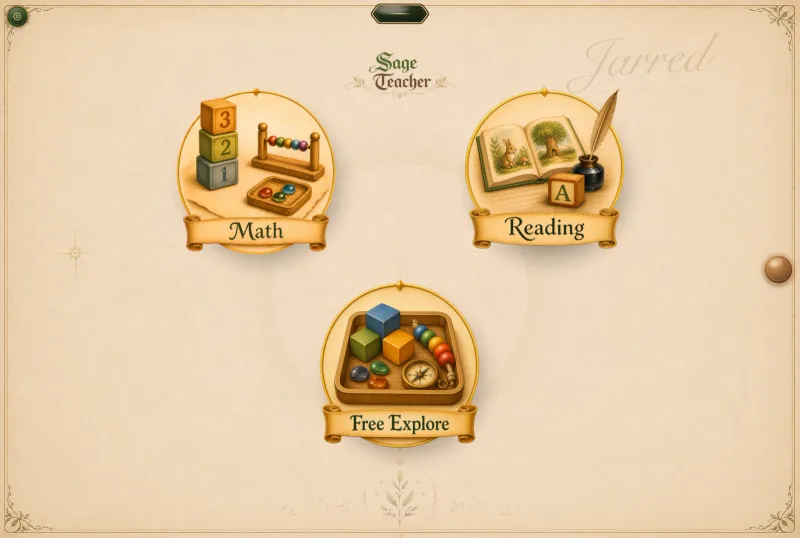
The session menu offers Reading, Math, and Free Explore.
How can parents stay involved in what their child is doing?
After each session, parents receive an email explaining what their child worked on and where they needed help. Parents can also ask Sage about their child’s progress. These details give families something specific to discuss and celebrate together when the device is put away.

Your next step
See what calmer learning can look like
Explore Sage Teacher’s reading and math lessons, creative activities, and parent-set session limits. A personal AI teacher leads the learning, and a guided wind-down helps bring each session to a close.
Start my free trial with Sage Teacher